The best Claude Code GUIs in 2026, compared

If you only use Claude, start with Anthropic's own Claude desktop app: its Code tab is free with a paid Claude plan and now does parallel sessions, worktrees, diff comments and a browser preview. If you want to run Claude Code and Codex side by side in isolated branches, look at Conductor or Superset (both Mac-first, both free to start). If you want to reach your sessions from a phone or a server, CloudCLI is the open-source pick. Orbit, which we make, is for people who want Claude, Grok and Codex in one chat plus a browser, inbox and planner around them.
Claude Code started as a terminal tool. Once you're running three or four sessions, reviewing diffs and testing in a browser, a window of scrolling text gets hard to manage, so there are now a dozen apps that wrap it in a graphical interface. Some are built for parallel branches, some for remote access, some for the editor you already use.
We checked each one on its own site or repository on 24 October 2026, and left out anything a page didn't say. We make Orbit, so we say plainly where the others are better.
What to look for in a Claude Code GUI
Before the list, the questions that actually separate these tools:
- Does it run the real Claude Code? Most run Anthropic's own
claudetool underneath, so your tools andCLAUDE.mdbehave the same. - Can it use your Claude plan? Your Pro or Max plan is very different from paying API prices per token.
- How does it keep parallel work apart? Git worktrees (a separate copy of the repo per session) are the usual answer.
- How do you review changes? A diff view with comments you can send back to the model saves more time than anything else.
- Can it check its own work? A built-in browser lets the model open your app, click through it and see what broke.
- Where does it run? Mac only, Windows, Linux, browser, phone. And does it keep working when your laptop sleeps?
- Other models. If you also use Codex or another model, a tool that runs both saves switching apps.
The comparison table
Checked 24 October 2026, on each product's own site or repository. Prices are as listed there; "Not listed" means we couldn't find it.
| Tool | Best for | Platforms | Models | Price |
|---|---|---|---|---|
| Claude desktop app (Code tab) | Claude-only users who want the official app | macOS, Windows, Linux (beta) | Claude | Included with a paid Claude plan (Pro from $20/mo) |
| Claude Code for VS Code | Working inside your editor | Wherever VS Code runs | Claude | Included with a paid Claude plan |
| Conductor | Parallel agents on a Mac | Mac | Claude Code, Codex, Cursor, OpenCode | Free; Pro $50/mo; Teams $60/user/mo |
| Superset | Many agents in worktrees, with automations | macOS; Linux (experimental); iPhone/iPad app | Claude Code, Codex, OpenCode, Gemini and more | Free; Pro $20/user/mo; Team $60; Ultra $200 |
| CloudCLI (Claude Code UI) | Reaching sessions from a phone or server | Browser (installable), self-hosted or hosted | Claude Code, Codex, Cursor CLI, Gemini CLI, OpenCode | Self-hosted free (AGPL-3); hosted from €7/mo |
| Nimbalyst | Agents plus docs, wiki and diagrams | Not listed on the home page | Claude Code, Codex | Free for individuals |
| Orbit | Claude, Grok and Codex in one chat, plus browser, inbox and planner | Mac, Windows, Android; iPhone/iPad in beta | Claude Code, Grok Build, Codex | 7 days free, then $29/mo |
Claude desktop app, with Claude Code: the official default
Anthropic's own desktop app has a Code tab that runs Claude Code with a visual interface. Going by Anthropic's desktop documentation, it's now a lot more than a chat window:
- Parallel sessions. Each conversation is a session with its own history and project folder. Open several at once, split two side by side, or pop one into its own window.
- Worktrees. Turn on Worktree before a session and it works in its own isolated copy of the repo.
- Diff review with comments. Click a line in the diff to comment, send all your comments together, and Claude makes the changes as a new diff. It can also watch a pull request's CI checks.
- A browser pane. Claude can start your dev server, open it, take screenshots, inspect the page and click elements. By default it checks its changes after every edit.
- Local, cloud, SSH and WSL sessions. Cloud sessions run on Anthropic's machines, keep going when you shut your laptop, and count toward your plan with no separate compute charge.
Claude Code is included with Pro ($20 a month billed monthly) and Max (from $100 a month) on Anthropic's pricing page, so if you already pay for Claude, this costs nothing extra.
Where it's better than the rest: it's Anthropic's own, cloud sessions are built in, it can comment on diffs line by line, and it runs on Linux. Where it isn't: it only runs Claude. If you also use Codex or Grok, you'll still be switching apps.
Pick it if: Claude is your only model and you want the least setup.
Claude Code for VS Code: if you live in your editor
Anthropic's VS Code extension is described as "the recommended way to use Claude Code in VS Code". It gives you a panel beside your code where you can review and edit Claude's plans before accepting them, auto-accept edits, @-mention files with line ranges, see past conversations and open several in separate tabs. It works with any paid Claude plan, with no API key needed.
Pick it if: you want Claude Code beside your files in your normal editor.
Conductor: parallel agents on a Mac
Conductor sums itself up as "Run parallel coding agents on your Mac." It runs Claude Code, Codex, Cursor and OpenCode, and its docs say "each task gets its own workspace, branch, files, terminal, diff, and review path." When a task is ready, Conductor helps you review the diff, open a pull request, merge and archive the workspace.
On its pricing page the Free plan covers parallel agents and local workspaces with your own subscriptions and keys. Pro ($50 a month per person) adds cloud workspaces with included hours, live collaboration for up to five Pro users, an API and the mobile app. Teams is $60 per user per month.
Where it's better: it's focused on "start five tasks, review five branches, merge the good ones". Where it isn't: it's Mac only, and the home page doesn't mention a browser for testing.
Pick it if: you're on a Mac and want to run Claude Code and Codex on several branches at once.
Superset: many agents, worktrees and automations
Superset calls itself "One workspace for Claude Code, Codex, and any coding agent." Each agent runs in its own git worktree. It adds automations on a schedule or an event, and remote access to workspaces on other machines. It names a long list of agents beyond Claude Code and Codex, including OpenCode, Gemini and Cursor Agent.
The desktop app is on macOS, with an experimental Linux AppImage; Windows isn't supported yet. There's also an iPhone and iPad app. You use your own keys, and Superset says it doesn't proxy model calls. The code is public under the Elastic License 2.0, which lets you read and self-host it but isn't an open-source licence in the strict sense. On its pricing page: Free for one user with local workspaces, Pro $20 per user per month (remote access, automations, Linear and Slack, mobile), Team $60 (adds cloud workspaces in beta) and Ultra $200.
Pick it if: you run lots of agents, including ones beyond Claude and Codex, and want scheduled automations.
CloudCLI (Claude Code UI): your sessions from any device
CloudCLI started as the open-source Claude Code UI project. It's a web interface, so you run it on your own machine or a server and open it from any browser, phone included. Its site lists Claude Code, Cursor CLI, Codex, Gemini CLI and OpenCode, with your own key or subscription. The self-hosted version is free under AGPL-3. Hosted cloud environments start at €7 a month for one environment, with a two-hour trial and no permanent free hosted tier.
Where it's better: it's the most flexible about where things run, and it's genuinely open source. Where it isn't: self-hosting means you look after the server and its security.
Pick it if: you want to check on or steer Claude Code from your phone, or run it on a server rather than your laptop.
Nimbalyst: agents with docs and diagrams
Nimbalyst is the successor to Crystal, an MIT-licensed app for running Claude Code and Codex in parallel worktrees that its makers deprecated in February 2026 in favour of Nimbalyst. The Nimbalyst app brings agents, tasks, docs, a wiki the agents write for you, diagrams and code into one workspace. It works with a Claude Code or Codex subscription or API key, it's free for individuals, and the code is on GitHub.
Pick it if: you want the agents' decisions and context written down as docs as they work, not just code.
Orbit: every model in one chat, with the rest of your day around it
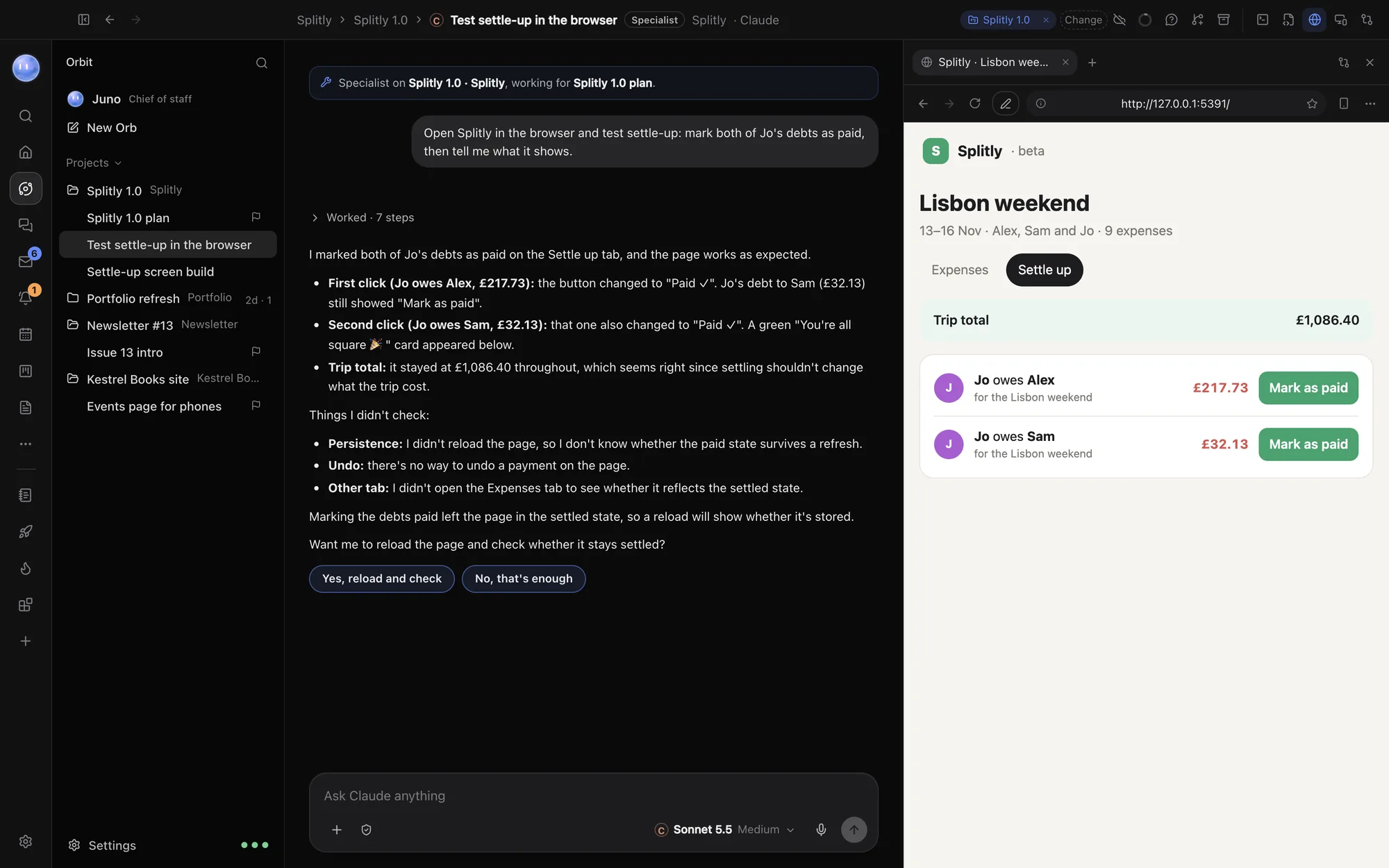
Orbit is the one we make, so read this section with that in mind. It runs Anthropic's official Claude Code on your Claude plan, xAI's Grok Build on your SuperGrok plan and Codex on your OpenAI API key, all in one chat, and you can switch model mid-conversation with the new one picking up what's been said and done. Around that are a built-in browser where each Orb (our name for an AI chat) works in its own tab, a terminal, an editor, a Changes pane for diffs and pull requests, and an always-on assistant called the Moon that can run jobs on a schedule. It also has an inbox, a planner, tasks and a board.
It runs on Mac and Windows, with an Android app and iPhone and iPad in beta. It costs $29 a month after a 7-day free trial, and never charges for model usage. Your chats, files and sign-ins stay on your computer.
Where it's better: it's the only one here that holds Claude, Grok and Codex in the same conversation, and it covers more than coding. Where it isn't: it doesn't create a git worktree for each chat automatically, as Claude desktop, Conductor and Superset can, so parallel Orbs on one repo need you to split the work by folder or branch. There's no Linux version, it isn't open source, and there's no free plan beyond the trial. If you just want a focused coding GUI, one of the free options above is a better fit.
Pick it if: you use more than one model family and want your coding, testing and day-to-day work in one app. It runs on your Claude plan, so it sits happily alongside the Claude desktop app rather than replacing it.
Others worth knowing about, with caveats
- 1Code (by 21st) was an Apache-2.0 client for running Claude Code and Codex in worktrees and cloud sandboxes. Its GitHub repository says it "was archived by the owner on Jul 7, 2026", so it's read-only now. We wouldn't start a new setup on it.
- opcode is an AGPL-3.0 desktop toolkit for Claude Code with session history, checkpoints, custom agents and a usage dashboard, for Windows, macOS and Linux. Its repository had no published releases when we checked, so you'd build it from source.
Who should pick which
| If you… | Start with |
|---|---|
| Only use Claude and want the official app | Claude desktop app |
| Want Claude inside your code editor | Claude Code for VS Code |
| Run several Claude Code and Codex tasks on one Mac | Conductor or Superset |
| Need scheduled automations across many agents | Superset |
| Want to reach sessions from a phone or run on a server | CloudCLI, or Claude desktop's cloud sessions |
| Want docs and decisions written as agents work | Nimbalyst |
| Use Claude, Grok and Codex and want one app for code and the rest of the day | Orbit |
| Are on Linux | Claude desktop (beta), CloudCLI, or the terminal |
Most of these drive the same Claude Code on your machine, so trying two costs an afternoon, not a migration.
A quick way to test any of them
Give each tool the same small, real task:
- Run two independent jobs at once on one repo, for example "add a settle-up screen" and "fix the date format on the expenses list". Does the tool keep them apart?
- Review both diffs in the tool. Can you comment on a line and send it back? Can you open a pull request?
- Ask the model to open the app in a browser and check its own work. Does the tool make that possible without extra setup?
- Close the laptop for ten minutes. What happened to the work?
Claude desktop's cloud sessions, Conductor's cloud workspaces and CloudCLI's hosted environments are built to keep going, and Superset's remote access lets workspaces run on another machine. Local-only sessions stop. In Orbit, cloud fallback can hand a Claude chat to a Claude Code cloud session on your plan when the Mac sleeps.
Common questions
What is a Claude Code GUI?
A desktop or web app that runs Claude Code, Anthropic's coding tool, with a graphical interface instead of the terminal. Most run the real claude tool underneath and add things like parallel sessions, diff review and a browser.
Does Anthropic make an official Claude Code GUI?
Yes. The Claude desktop app has a Code tab for macOS, Windows and Linux (beta), and there's an official VS Code extension. Both work with a paid Claude plan.
Can I use my Claude Pro or Max plan in third-party GUIs?
Many of them say so: Conductor's free plan mentions your own subscriptions and keys, Nimbalyst works with a Claude Code subscription or API key, and Orbit signs in with your own Claude plan. Check each tool's own page, because some only take API keys.
Which Claude Code GUI is free?
The Claude desktop app and VS Code extension come with a paid Claude plan. Conductor and Superset have free plans, CloudCLI is free to self-host, and Nimbalyst is free for individuals. Orbit has a 7-day free trial, then $29 a month.
Is there a Claude Code GUI for Windows?
Yes. The Claude desktop app runs on Windows (including WSL sessions), the VS Code extension runs wherever VS Code does, CloudCLI runs in any browser, and Orbit runs on Windows. Conductor and Superset don't list Windows today.
Where to go from here
If Claude is your only model, install the Claude desktop app and turn on worktrees. If you run lots of parallel tasks, try Conductor or Superset's free plans. And if you want Claude, Grok and Codex together with a browser, inbox and planner in one place, download Orbit and try it free for 7 days on the plans you already have. The help pages on connecting Claude and Orbs in the browser show how it works.