Compare
Orbit vs the Claude desktop app
Both apps run Claude on your own Claude plan, so this isn't a choice between models. It's a choice between Anthropic's own app, which goes deepest on Claude, and Orbit, which puts Claude beside Grok, Codex and the rest of your day.
If Claude is the only AI you use, start with the Claude desktop app: it's free to download, made by Anthropic, gets Claude's new features first and has Claude Code, Cowork, worktrees and pull request tracking built in. Choose Orbit if you also use Grok or Codex, run several projects at once, or want your planner, inbox, board and a browser your AI can drive in the same window. Orbit signs in with the same Claude plan, so you can keep both.
What each one is
The Claude desktop app is Anthropic's own app for Mac, Windows and, in beta, Linux (claude.com/download). It has three sides. Chat is Claude as you know it from claude.ai. The Code tab is Claude Code with a graphical interface: parallel sessions, an optional Git worktree for each session, a diff view you can comment on, a dev-server preview, pull request status with CI checks, and an integrated terminal. Cowork takes a goal and works across your files and tools, on a schedule if you like, with its own browser in the desktop app.
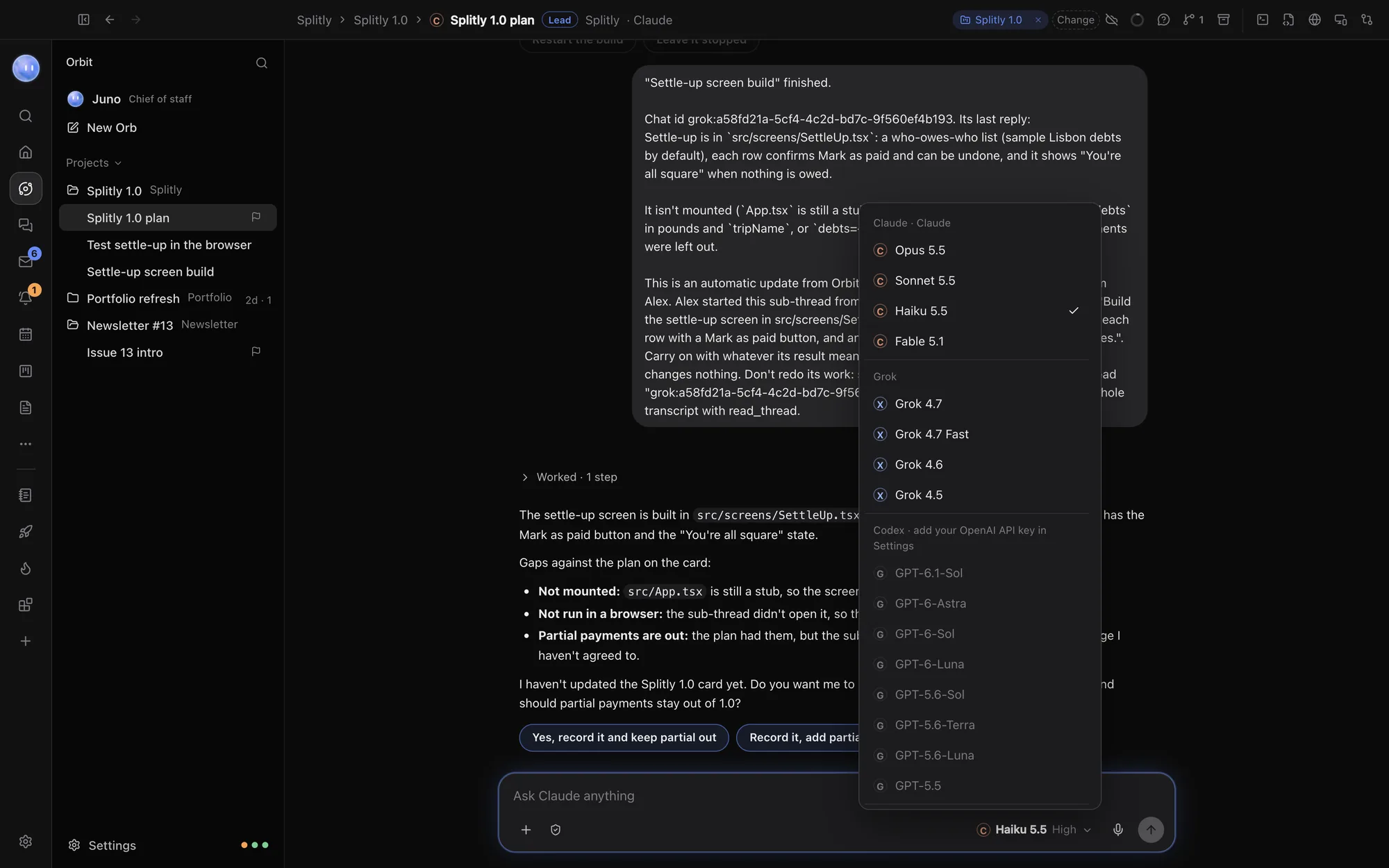
Orbit is a desktop app where every AI chat is an Orb. Orbit runs Claude Code on your own Claude plan, Grok on your SuperGrok plan and Codex on your OpenAI API key, and one chat can move between them. Around the chats are a browser, terminal, editor, Changes pane, pull requests, and your day: Home, Planner, Tasks, the Board, Inbox, Transcripts and Journal. The Moon, your always-on lead Orb, watches all of it. See what Orbit is.
Side by side
Checked 24 October 2026. Facts about Claude come from Anthropic's own pages, linked in each row. Anthropic ships often, so check the latest before you decide.
| Claude desktop app | Orbit | |
|---|---|---|
| Made by | Anthropic, the company behind Claude | SUPERORBIT LTD, an independent UK company |
| Runs on | macOS (Intel and Apple silicon), Windows (x64 and Arm), Linux in beta (download) | macOS 13 or later, Windows 10 and 11; Android app; iPhone and iPad in beta |
| Models | Claude | Claude, Grok and Codex, switchable mid-chat |
| Price | Free to download; Pro $20 a month ($17 billed yearly), Max from $100 (pricing). Claude Code needs a paid plan | 7 days free, then $29 a month (£29 / €29 locally) (founding price), on top of your Claude, SuperGrok or OpenAI account |
| Parallel coding sessions | Yes, with an optional Git worktree per session (docs) | Yes: many Orbs per project, a lead Orb handing work to sub-threads in the same folder |
| Diff review | Diff view with line comments Claude acts on; /code-review (docs) | Changes pane for every edit; pull requests with "review with Claude" or Codex |
| Pull requests | PR status with CI checks, Auto-fix and Merge when ready (needs the GitHub CLI) (docs) | Open pull requests listed per project, opened on GitHub, reviewed by an Orb |
| Browser | Dev-server preview in the Code tab; a browser in Cowork; Claude in Chrome as an extension (Cowork, Chrome) | A full browser in the window, with each Orb in its own tabs, plus page, speed, SEO and device checks |
| Connectors | Connectors and MCP servers (docs) | About 30 official connectors that every Orb can use, whatever its model, plus your own by address |
| Scheduled work | Scheduled tasks in Cowork and in Claude Code (Cowork, docs) | The Moon's scheduled jobs, check-ins and briefings |
| Planner, inbox, board | Through connectors to the tools you use | Built in: Planner with Google Calendar, Tasks, Board with projects, leads and people, Inbox, Journal |
Where the Claude desktop app is better
- It's Anthropic's own. New Claude features land there first, and some are only there: Cowork, Dispatch for sending tasks from your phone, and computer use as a research preview on Pro and Max (docs). Orbit runs Claude Code, which is the coding side, not everything in Claude's app.
- Free to start. The app is free and available on every Claude plan, including Free (download). Orbit is a subscription after the trial, on top of your Claude plan.
- Worktree isolation. A Code session can work in its own Git worktree, so two sessions never edit the same files on disk. Orbit's Orbs in a project share its folder.
- Pull request automation. Auto-fix for review comments and Merge when ready go further than Orbit's pull request tab, which lists, opens and reviews.
- Linux, SSH and cloud sessions. The Code tab can run sessions locally, over SSH, on Anthropic's cloud or in WSL (docs). Orbit runs on Mac and Windows, with cloud fallback for chats while your computer sleeps.
- Company admin. Team and Enterprise plans come with admin controls and approved extensions. Orbit's Teams are for small teams.
Where Orbit is better
- More than one AI company. Claude, Grok and Codex in one picker, and one chat can switch between them, each model reading the whole conversation. When your Claude plan runs low, carry on with Grok or Codex instead of waiting. See every model in one chat.
- Your day in the same window. The Planner, Tasks, Board, Leads, Inbox, briefings and Journal are part of Orbit, and Orbs keep them up to date as they work. In Claude's app, you'd connect each tool and ask.
- The Moon. One lead Orb across all your projects. It checks your messages and calendar, drafts replies for you to approve, hands jobs to the right project chat and brings the answer back. Its rules decide what it does alone, what it asks about and what it always hands back: out of the box, sending, publishing, payments and passwords come back to you. See What the Moon does.
- Projects run by a lead. Each project's lead Orb keeps its Board card current and gives pieces to specialist sub-threads, which report back. See Lead Orbs and sub-threads.
- A browser built for sharing. Orbs get tabs of their own and never take over yours. Sign-ins and "prove you're human" checks are handed to you. Built-in checks cover phone layouts, speed, SEO and console errors.
- Keys your Orbs never see. The Secret box puts a key into a command or form at the last moment and keeps it out of the transcript. See security.
- One list of approvals. Waiting on you gathers every Orb's questions in one place, on your computer and your phone.
Complements, not rivals
Orbit doesn't replace your Claude plan. It signs in with it, using Anthropic's own sign-in, and works within its limits. You can keep the Claude desktop app for Cowork and Claude's own features, and use Orbit for the project work where you want Grok or Codex alongside, the browser and terminal beside the chat, and the Moon keeping your day straight. Both draw on the same plan, so heavy use in one leaves less in the other.
Who should choose which
- Choose the Claude desktop app if Claude is your only model, you want Anthropic's newest features the day they ship, you need Linux or SSH sessions, or you're on a company plan.
- Choose Orbit if you use Claude and also Grok or Codex, run several projects or clients at once, and want your planner, inbox and board where your Orbs can use them.
- Keep both if you like Cowork, and want Orbit for coding and running projects.
Common questions
Do I need a Claude plan to use Claude in Orbit?
Yes. Orbit signs in with your own Claude plan and uses its limits. It never charges for model usage. See Connect Claude.
Is Claude in Orbit the same Claude?
Orbit runs Anthropic's official Claude Code engine, unmodified, on your computer, with the Claude models your plan includes. Features that live only in Claude's own app, like Cowork and Dispatch, stay there.
Can I use both apps on the same plan?
Yes. Both sign in with your Claude account, and usage in either counts towards the same plan limits.
Does Orbit have worktrees like Claude Code on desktop?
Not as a per-Orb setting. Orbs in a project work in its folder, with a lead Orb splitting the work so they don't collide. If you need strict isolation per session, Claude's Code tab and tools like Conductor do it.
Which is better for non-developers?
If you want help with documents, research and spreadsheets on Claude alone, Cowork in the Claude app is built for that. If you run a business from your laptop and want projects, leads, inbox and calendar in one place with an AI that keeps them current, Orbit suits you better.
Try Orbit free for 7 days · Claude desktop alternatives · More comparisons
Updated 24 October 2026