Compare
Orbit vs the ChatGPT desktop app
OpenAI's desktop app now carries ChatGPT Work and Codex together, on your ChatGPT plan. Orbit runs Codex too, beside Claude and Grok. Here is where each one wins, including one place Orbit is clearly behind today.
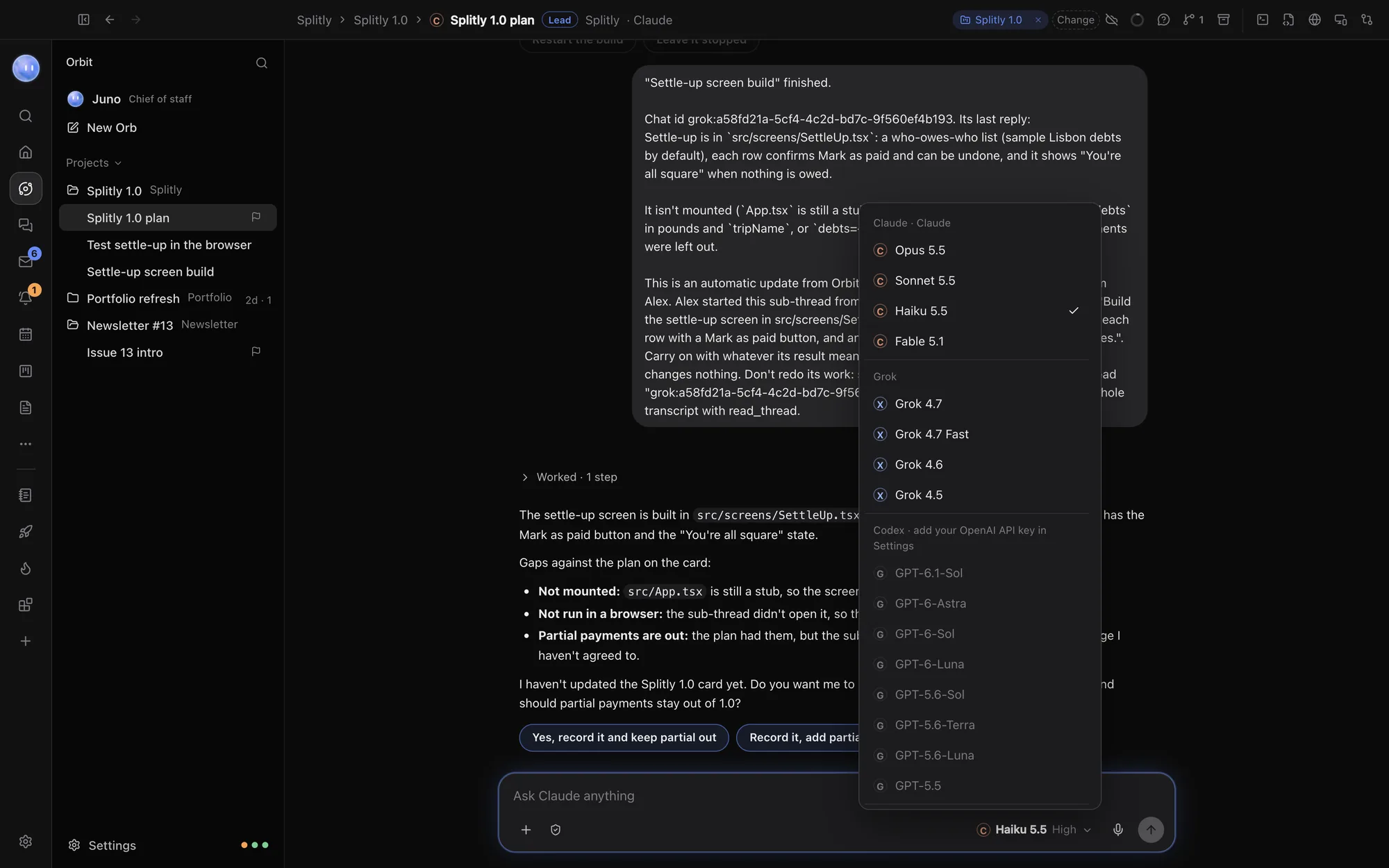
If you pay for ChatGPT and mostly use OpenAI's models, the ChatGPT desktop app is the better deal today: Codex comes with your plan, and it adds ChatGPT Work, voice and image creation. Choose Orbit if you also use Claude or Grok, want to switch models inside one chat, and want a browser, terminal, planner, inbox and board in the same window. In Orbit, Codex currently runs on your own OpenAI API key; signing in with ChatGPT is coming soon.
What each one is
The ChatGPT desktop app brings "ChatGPT Work and Codex, plus context from your email, screenshots, files, and anything on your screen" to your computer (chatgpt.com/download). Codex is OpenAI's coding agent. OpenAI says it "runs many agents in parallel, using computer and browser tools to verify work", keeps going in the cloud when you close your laptop, and reviews pull requests automatically. The same Codex runs in ChatGPT, in your editor and in the terminal, all on your ChatGPT account (openai.com/codex).
Orbit is a desktop app where each AI chat is an Orb, filed under a project. Orbs run on Codex, Claude or Grok, and one chat can switch between them. Around the chats sit a browser the Orbs can drive, a terminal, an editor, a Changes pane and pull requests, plus Home, Planner, Tasks, the Board, Inbox and Journal. Your Moon, the always-on lead Orb, keeps an eye on everything. See what Orbit is.
Side by side
Checked 24 October 2026. Facts about ChatGPT and Codex come from OpenAI's own pages, linked in each row. Prices are the UK prices OpenAI's pricing page showed us; yours may differ.
| ChatGPT desktop app | Orbit | |
|---|---|---|
| Made by | OpenAI | SUPERORBIT LTD, an independent UK company |
| Runs on | The download page offered the new app for macOS, and ChatGPT Classic for Mac and Windows (download) | macOS 13 or later, Windows 10 and 11; Android app; iPhone and iPad in beta |
| Models | OpenAI's GPT models | Codex, Claude and Grok, switchable mid-chat |
| How Codex is paid for | Included in ChatGPT plans, with limited access on Free (Codex, pricing) | Your own OpenAI API key, billed by OpenAI per use. ChatGPT sign-in: coming soon |
| Price | Free £0, Go £7, Plus £20, Pro from £89 a month (pricing) | 7 days free, then $29 a month (£29 / €29 locally) (founding price), plus your AI accounts |
| Parallel agents | Yes, with computer and browser tools to check work (Codex) | Yes: many Orbs per project, with a lead Orb handing work to sub-threads |
| Cloud | Codex cloud keeps going when your laptop is closed (Codex) | Cloud fallback for chats you choose; send Codex cloud tasks on a GitHub pull request |
| Code review | Automatic pull request reviews (Codex) | Changes pane for every edit; pull requests reviewed by Codex or Claude on request |
| Always-on assistant | Pro includes "Dot, your always-on agent" (pricing) | The Moon, on every subscription, running on Claude, Codex or Grok |
| Planner, inbox, board | Scheduled tasks and projects on Plus; context from your apps (pricing) | Built in: Planner with Google Calendar, Tasks, Board with leads and people, Inbox, Journal |
Where ChatGPT is better
- Codex on your ChatGPT plan. This is the big one. If you already pay for Plus or Pro, Codex in OpenAI's app comes out of that plan. Orbit can't sign in with ChatGPT yet: OpenAI only lets apps it has approved use your ChatGPT plan, Orbit has applied, and until then Codex chats in Orbit run on an OpenAI API key, billed per use. See Add Codex.
- Everything OpenAI makes. Voice conversations, image creation, deep research, custom GPTs and ChatGPT Work all live in OpenAI's app (pricing). Orbit runs Codex, the coding side.
- A free way in. ChatGPT has a free plan, including limited Codex. Orbit is a subscription after a 7-day trial.
- Codex everywhere. The same agent in ChatGPT, an IDE extension, the CLI and the web, with cloud environments for each repo and automatic pull request review (openai.com/codex).
- First-party updates. New OpenAI models and Codex features arrive in OpenAI's app first.
Where Orbit is better
- Not just OpenAI. Claude on your Claude plan and Grok on your SuperGrok plan sit in the same picker as Codex. A chat can start on Codex, ask Claude to review what it did and finish on Grok, each model reading the whole chat. A group chat can have two or three models answer each message in turn. See Switch models mid-chat.
- When a plan runs low, carry on. Switch the chat to another model family instead of waiting for a reset.
- Your day, built in. Planner and calendar, Tasks, a Board for projects, leads and people, an Inbox for your email and chat apps, briefings and a Journal. Orbs read and update them as they work.
- A Moon on every plan. The Moon checks in on your messages, calendar and Orbs, runs scheduled jobs, drafts replies and passes work to the right project. It never sends, publishes or pays without your OK. See your Moon.
- A browser and terminal beside the chat. Orbs work in their own browser tabs, run checks for phone layouts, speed and SEO, and use the same terminal you see. See the workspace.
- Windows and Android. Orbit runs on Windows 10 and 11, and its Android app shows your Orbs, Moon, Inbox and Planner live from your computer.
Codex in Orbit today
There are three ways to use Codex from Orbit right now:
- On your OpenAI API key. Add it in Settings, AI models. Codex chats then work like any other Orb. OpenAI bills your account; Orbit adds nothing.
- In Orbit's terminal. Run OpenAI's own
codexprogram in the terminal beside your chat, as you would anywhere else. - As a Codex cloud task. Ask an Orb or your Moon to send a task to Codex cloud on a GitHub pull request. It runs in OpenAI's cloud on your ChatGPT plan, once GitHub is connected at chatgpt.com/codex.
When OpenAI approves Orbit, Sign in with ChatGPT on the Codex card switches on, and Codex chats can use your ChatGPT plan directly.
Who should choose which
- Choose ChatGPT's app if you're all-in on OpenAI, pay for Plus or Pro, and want Codex, voice, images and ChatGPT Work on that one plan.
- Choose Orbit if you use Claude or Grok as well as Codex, run several projects at once, and want the browser, terminal, planner and inbox with your chats.
- Use both if you like ChatGPT for voice and research, and want Orbit for running projects across models.
Common questions
Can I use my ChatGPT Plus plan for Codex in Orbit?
Not for Codex chats yet. Orbit has applied to OpenAI for ChatGPT sign-in, and it's shown as coming soon. Today you can run Codex chats on an OpenAI API key, run the codex program in Orbit's terminal, or send Codex cloud tasks on a GitHub pull request, which run on your ChatGPT plan.
Does Orbit charge for Codex usage?
No. Codex usage is between you and OpenAI. Orbit's subscription covers the app, never the models.
Can my Moon run on Codex?
Yes. Pick a Codex model for it in Settings, in the section with your Moon's name, under Model.
Is Orbit's Moon the same as ChatGPT's Dot?
They're different products from different companies. OpenAI lists Dot as an always-on agent on ChatGPT Pro. Orbit's Moon comes with every Orbit subscription and works across your Orbs, projects, inbox and calendar inside Orbit.
Does Orbit work on Windows?
Yes, on Windows 10 and 11. Voice calls are Mac only for now.
Try Orbit free for 7 days · Add Codex · More comparisons
Updated 24 October 2026