How to use Claude, Grok and Codex in one chat, and when to switch

Use one model to plan and build, then switch to a different one to check the work, because a second model catches what the first one talked itself into. In our experience Claude (Opus 5.5) is the best default for long jobs and clear writing, Codex (GPT-6.1 Sol) is a strong, cheap second coder and reviewer, and Grok (4.7) is good at turning a rough idea into a first working version and at a blunt second opinion. In Orbit you switch from the model picker under the message box, and the new model is handed the conversation so far and keeps working in the same folder.
Most people who use AI every day already pay for more than one model. They just use them in separate windows, copy and paste between them, and lose half the context on the way. This guide is about doing it properly: which model to reach for, when to change, what actually travels with the chat when you do, and what it costs. Most of it works with any tools.
What each model is good at, according to its makers
Benchmarks move every few weeks, so treat this as a snapshot from late October 2026. These are the makers' own claims, which is why we link them.
Claude (Opus 5.5, Sonnet 5.5, Haiku 5.5, Fable 5.1)
Anthropic released Opus 5.5 on 22 September 2026 and says it "performs at the level of Claude Fable 5.1 on most work" at about 40% lower cost than Opus 5. Anthropic singles out "long and sprawling jobs like codebase-wide migrations and audits", says it "communicates more naturally than prior models", and calls it "a reliable and adept researcher". On the API it costs $4 per million input tokens and $20 per million output tokens.
In Claude Code, the smaller models still matter. Anthropic's model guide describes Sonnet as the model "for daily coding tasks" and Haiku as "fast and efficient" for simple ones. Fable 5.1 is the one it suggests for your hardest, longest tasks.
Codex (GPT-6.1 Sol)
OpenAI introduced GPT-6.1 Sol on 29 September 2026. Its pitch is price: close to GPT-6 Astra on agentic coding, computer use and professional work, at about a fifth of Astra's token price. On the API it's $2 per million input tokens, $10 per million output and $0.10 per million cached input. OpenAI also reports fewer factual errors on hard prompts than GPT-6 Sol.
Grok (4.7 and 4.6)
xAI calls Grok 4.7 (21 September 2026) its "most capable model for coding and knowledge work", built to stay on hard tasks longer and check its own output more carefully, and better at documents and presentations. Of Grok 4.6 (12 August 2026) it said: "especially strong at turning a broad product idea into a working first version." xAI's own table showed Grok 4.6 behind GPT-5.6 Sol on the DeepSWE coding test, which is the kind of honesty worth noting. API pricing starts at $2 per million input tokens and $6 per million output.
None of these numbers tell you which model will be best on your codebase. The cheapest test is the one in this post: give the same task to two models in the same chat and compare.
Why switching mid-chat beats starting over
The value of a second model is that it didn't write the first answer. A model reviewing its own work tends to defend it. A different model, reading the same conversation cold, will question an assumption, spot the test that wasn't written, or say the plan is too big.
But a second opinion is only useful if the second model knows what happened. Pasting "here's my code, is it OK?" into another app throws away the why: what you asked for, what was tried and failed, which files changed. Switching inside one chat keeps all of that.
There are three ways to do it today:
- Within one family. In Claude Code,
/modelswitches between Claude models mid-session, and theopusplansetting uses Opus while planning and Sonnet while building (Anthropic's docs). This is free, quick, and the right first step if you only use Claude. - By hand, across families. Ask the first model to write a handover: the goal, what's done, what's left, the files touched and the open questions. Paste that into the other tool, pointed at the same folder. It works, and it's what we did for months before we built Orbit. It's slow and you lose the detail.
- In one chat that holds every model. This is what Orbit does. The rest of this section explains exactly how, so you know what you're getting.
How switching works in Orbit, and what carries over
Every Orb (Orbit's name for an AI chat) has a model picker under its message box. It lists the Claude models on your Claude plan, the Grok models on your SuperGrok plan and the Codex models on your OpenAI API key, plus a Reasoning level for how hard the model thinks.
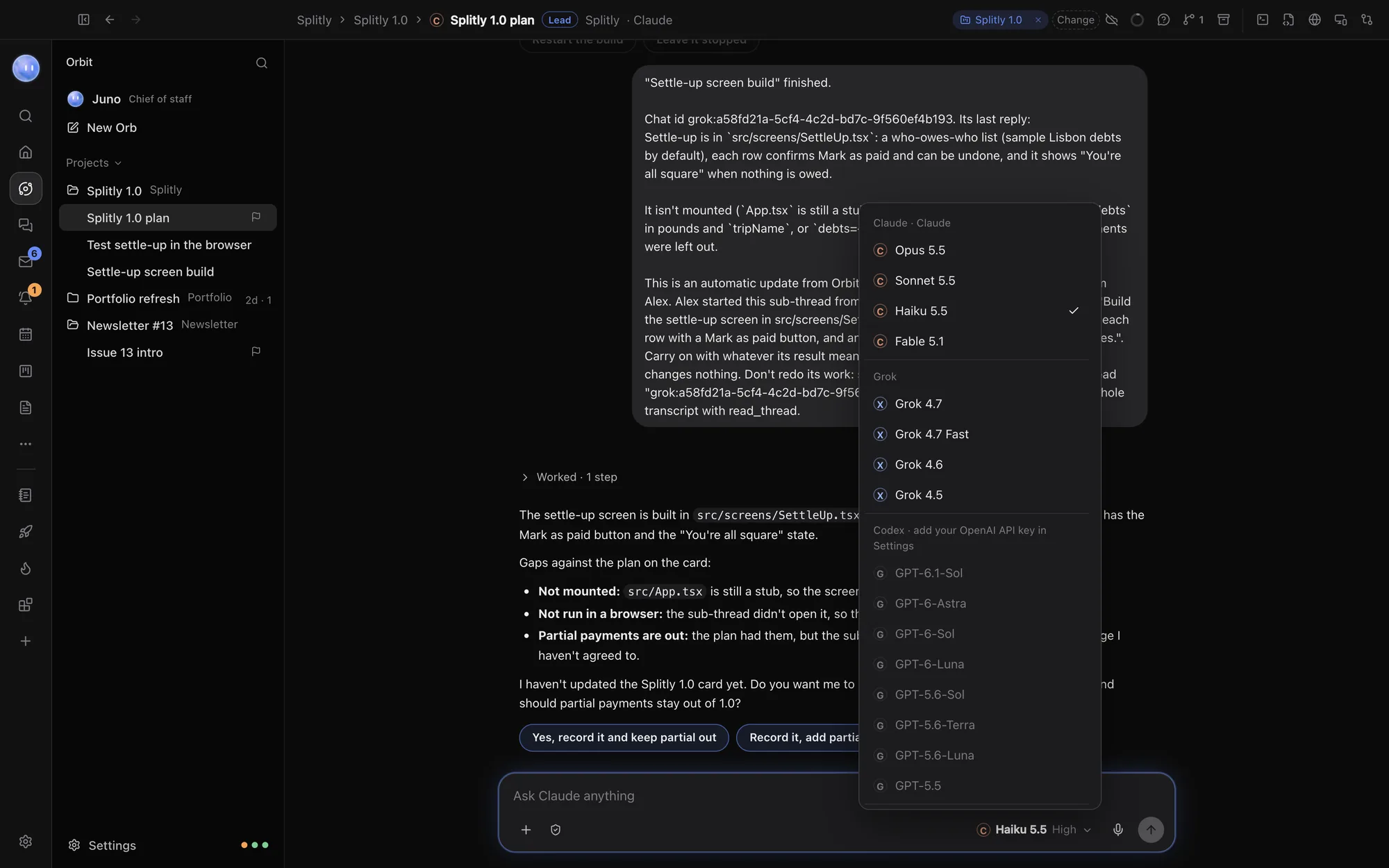
- Open the chat you're working in and click the model name under the message box.
- Pick a model from another family, for example Grok 4.7.
- Send your next message as normal: "Review what Claude just did. What would break?"
Here is what the new model receives, taken from how Orbit's code builds the handover:
- The conversation so far. Your messages, the previous model's replies and any plan it wrote. If this model has spoken in the chat before, it gets only what happened since it last spoke.
- What was done, not just said. Each command that ran, with its exit code and the start of its output, each file edited with lines added and removed, and the tools that were used.
- The same folder. The chat stays linked to its project folder, so the new model reads the real files on disk, including changes the last model made a minute ago.
- The same project rules. Codex reads
AGENTS.mdand Claude Code readsCLAUDE.md. Orbit hands each model whichever of those files it wouldn't load itself, so all three follow one set of project instructions.
And what doesn't carry over:
- Very long histories in full. The handover keeps the most recent part of the chat, about 12,000 characters, with long entries trimmed. It says how many earlier entries were left out, and the model can call Orbit's
read_threadtool to read the whole transcript if it needs to. - Full command output. The handover carries the first few hundred characters of each command's output. If a long test log matters, ask the new model to run the tests again.
- The previous model's private reasoning. It gets what the model said and did, not its hidden thinking.
Two related tools are worth knowing. A Group chat (bottom of the same picker) sends each message to two or three models in turn, and each one is told to add its own view and say where it agrees or disagrees with the others. A Side question (⌘;) asks about the chat without interrupting it. Full steps are in the help page Switch models mid-chat.
A playbook: which model for which job
This is how we work on Orbit itself and on the example app we use in our demos, Splitly. It's a starting point; change it when your own results disagree.
| Job | Start with | Switch to | Why |
|---|---|---|---|
| Planning a feature | Claude Opus 5.5 (or Fable 5.1 for big ones) | Grok or Codex to challenge the plan | Claude is good at long, careful plans; a second model is good at saying what's missing. |
| Building it | Claude Opus 5.5 or Sonnet 5.5 | Codex for a stuck bug | A different model often finds a bug the first one has circled for twenty minutes. |
| Reviewing a change | Whichever model didn't write it | (none) | The point is fresh eyes. |
| A quick first version of an idea | Grok 4.7 | Claude to tidy and extend | xAI's own claim for Grok is first working versions from broad ideas. |
| Writing (docs, emails, release notes) | Claude Opus 5.5 | Grok for a blunt edit | Anthropic's stated strength is natural, skimmable writing. |
| Research with sources | Claude Opus 5.5 | Codex to check the facts | Ask the second model to verify each claim against its link. |
| Small, repetitive edits | Haiku 5.5 or Sonnet 5.5 | (none) | Fast and light on your plan's limits. |
| Clicking through the app in a browser | Claude Opus 5.5 | Another model to re-test the fix | Long, many-step tasks suit it; see our browser testing guide. |
Prompts that make a switch worth it
The message you send right after switching does most of the work. These are the ones we use:
- The sceptical review: "You didn't write any of this. Read the diff and the conversation. List what's likely to break, what isn't tested, and anything that doesn't match what I asked for. Don't fix anything yet."
- The plan challenge: "Here's the plan above. What would you cut? What's the riskiest step, and how would we find out early?"
- The stuck bug: "The last model tried three fixes for this and none worked (they're above). Don't repeat them. Read the code fresh and tell me what you think is actually wrong before changing anything."
- The fact check: "Check every number and claim in the draft above against its source link. Mark each one confirmed, wrong or unsupported."
- The handback: after Grok or Codex has reviewed, switch back to Claude and say "Address the review above. Push back on anything you disagree with and say why."
That last one matters. You don't have to accept the second model's view. Letting the first model argue back, with you deciding, gets better results than either alone.
When not to switch
- In the middle of a working run. If a model is fixing things and tests are going green, let it finish. Switching mid-task means the new model starts from a summary.
- For taste. If you just don't like a sentence, edit it. Switching models to rewrite a paragraph burns limits for little.
- When the chat is very long. The new model only gets the recent part in its handover. Start a fresh chat with a clear summary instead, or ask it to read the transcript first.
What it costs on your own plans
Using three models doesn't have to mean three new bills. In Orbit each model runs on what you already have, and Orbit never charges for model usage:
- Claude runs Claude Code on your Claude plan and uses its limits. On Anthropic's pricing page, Claude Code is included with Pro ($20 a month billed monthly) and Max (from $100 a month), and not with the free plan. Help: Connect Claude.
- Grok runs Grok Build on your SuperGrok or X Premium+ plan and uses its limits. Check current prices on xAI's own site. Help: Connect Grok.
- Codex runs on your own OpenAI API key and bills your OpenAI account at OpenAI's prices. Signing in with a ChatGPT plan is coming soon. Help: Add Codex.
The API key is the one where cost depends on use, so here's the arithmetic. At GPT-6.1 Sol's list price, a review that reads 300,000 tokens of code and conversation and writes 20,000 tokens back costs about $0.60 for input plus $0.20 for output: roughly 80 cents, less if much of the input is cached. A long build session can be several times that. Set a monthly limit in your OpenAI account before you start, and use Codex for reviews and stuck bugs rather than every small edit.
A sensible setup for most people: one Claude plan for daily work, Codex on an API key as the second opinion, and Grok if you already pay for SuperGrok. If you use more than one Claude account, Orbit can move to the next one when the account in use runs low.
The limits, honestly
- Models disagree, and sometimes both are wrong. Two confident answers aren't proof. Run the tests, open the page, read the diff.
- The handover is a summary, not a memory transplant. The new model knows what happened recently and can read the rest, but it wasn't there.
- Models differ inside Orbit too. Claude and Codex take a message in at their next step while they work. Grok can't take a message mid-reply, so yours waits in the chat with an Interrupt link under it (see Send any time).
- Plan limits are separate. Each model's usage comes out of its own plan or key. Running all three on one task uses some of each.
- Benchmarks age fast. The model that's best for reviews this month may not be next month. Re-run your own two-model test every so often.
Common questions
Can I use Claude, Grok and Codex in the same chat?
Yes, in a tool that holds all three. In Orbit you pick any of them from the model picker under the message box, chat by chat, and switch whenever you like. In single-model tools you can switch within one family (for example /model in Claude Code) and hand over to other tools by hand.
Does the new model see what the old one did?
In Orbit it gets the recent conversation (about 12,000 characters, newest first), the commands that ran and their results, and the files that changed, and it works in the same folder. It can read the full transcript if it needs more. It doesn't get the previous model's private reasoning.
Which model is best for coding?
There's no single answer. Anthropic positions Opus 5.5 for long, sprawling coding jobs, OpenAI positions GPT-6.1 Sol as near its top model at a fifth of the price, and xAI positions Grok 4.7 as its strongest coder. We use Claude to build and a different model to review, which catches more than any one model alone.
Do I need to pay for all three?
No. Orbit needs at least one of a Claude plan, a SuperGrok plan or an OpenAI API key. Add the others when you want a second opinion.
What's a group chat, and when should I use one?
A group chat sends each message to two or three models in turn, and each adds its own view to the others'. It's useful for decisions, like choosing between two designs. For building, one model at a time with a review switch is quicker and uses fewer limits.
Try it on your next feature
Next time a model finishes a piece of work, don't accept it straight away. Switch to a different model in the same chat, send the sceptical review prompt above, and see what it finds. If you want all three models in one place, with the browser, terminal and your project folders alongside, download Orbit and try it free for 7 days. It runs on the Claude, SuperGrok and OpenAI accounts you already have. More on the models in Orbit is on the models page.