Help/Browser
Page checks
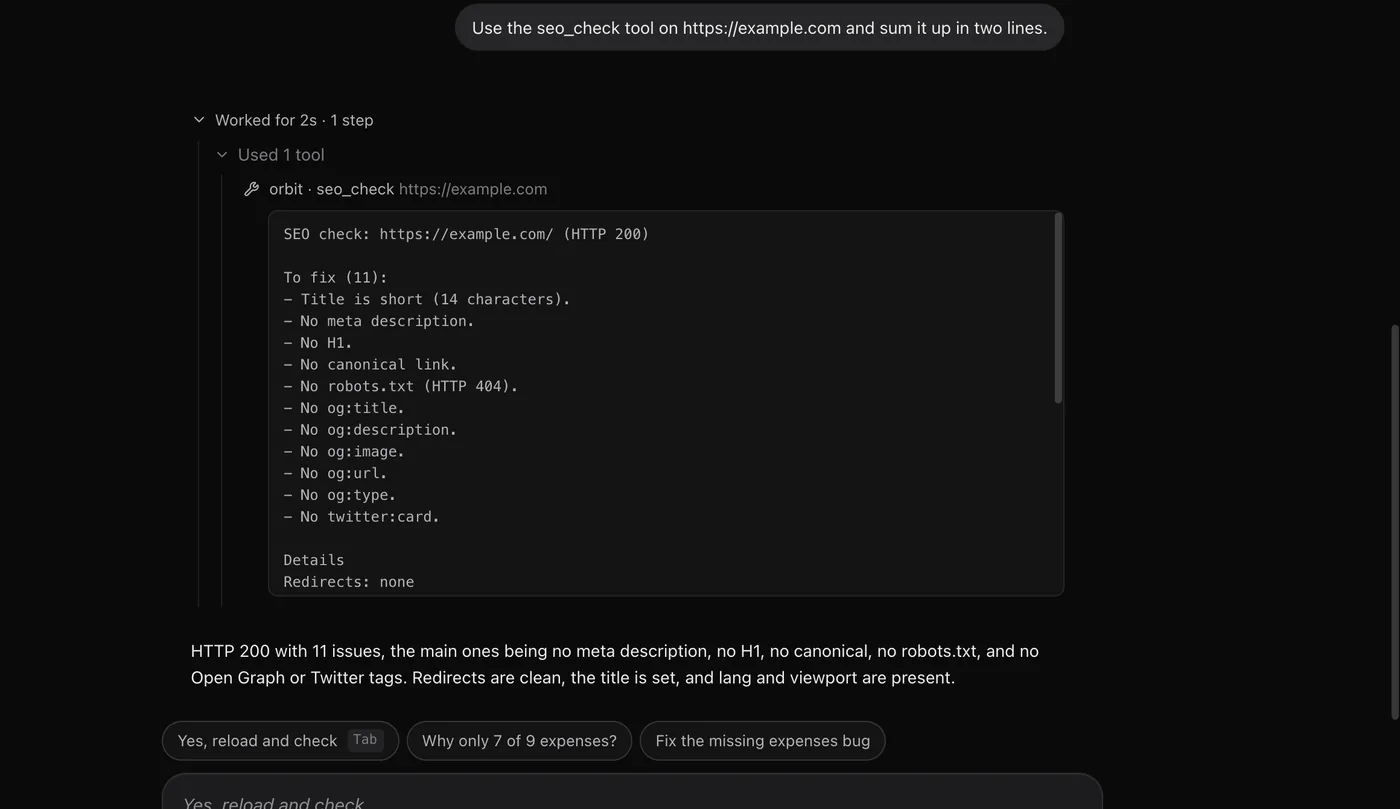
Orbs have built-in tools for checking web pages: SEO basics, page speed, layout on phone and desktop, and pulling a site's brand, images and text. Ask in plain words and the results come back in the chat.
How to run a check
There's no separate screen for checks. Ask any Orb in a chat, and name the page:
- "Run an SEO check on kestrelbooks.example.com and tell me the three biggest fixes."
- "How fast is the Splitly pricing page on mobile?"
- "Check our homepage on phone and desktop for anything broken."
If you leave the address out, the Orb checks the page its browser tab is on. These tools work on Claude, Codex and Grok.
The checks
| Check | What it looks at |
|---|---|
| SEO check | Redirects and status, the title and description (with their lengths), H1s and heading outline, canonical, robots meta and X-Robots-Tag, robots.txt rules for the page, the sitemap (found, size and whether it lists the page), hreflang, Open Graph and Twitter tags, structured data types, images missing alt text, language and viewport. |
| Speed check | Google Lighthouse scores and Core Web Vitals from PageSpeed Insights, real-visitor data from the Chrome UX Report (for the page and the whole site, where Google has enough data) and a load measured on your computer. Mobile and desktop. Takes about a minute. |
| Page check | Renders the page on phone and desktop and saves both, with a side-by-side sheet. Finds sideways scrolling (and the elements causing it), broken images and failed requests, text with too little contrast (WCAG AA), tap targets too small on a phone, and console errors. |
| Screenshots | Full-page or single-element screenshots at several device sizes at once, saved as PNGs. |
| Shopify snapshot | A Shopify store at a glance from its public shop: theme, apps, tracking pixels, currency and markets, product and collection counts, prices and stock. |
Pull things from a page
| Tool | What you get |
|---|---|
| Brand kit | A folder with the site's colour palette, fonts and font files, logos, favicon and app icons, button and text styles, and a preview sheet. |
| Page assets | Every image, video and SVG on the page at full size, without duplicates, with alt text, where each sits, and a contact sheet. |
| Read a page | The page's text as tidy Markdown, after its scripts have run, so it works on modern sites. |
| Page styles | The exact CSS of an element, like a button's colours, spacing and hover state. Pick it by its text, like "the Add to basket button". |
Where the files go
Screenshots, renders, brand kits and assets are saved in a new folder inside Downloads/Orbit, named after the site and the time. They show up in Files. To save somewhere else, tell the Orb, for example "save it in the Splitly project".
Pages behind a sign-in
By default these tools load a page the way a first-time visitor sees it, in the background, so your tabs aren't touched. For a page behind a login, or a shop's password page, sign in once in Orbit's browser and ask the Orb to check it "signed in". It then uses your browser's sign-ins.
Common questions
Do I need a Google account or API key for the speed check?
No. The Orb runs PageSpeed Insights in the background in Orbit's browser.
Can an Orb fix what it finds?
Yes, if the site's code is in the chat's project. Ask it to fix the issues, then run the check again. Changes it makes show in Changes.
Related: Orbs in the browser, Devices, recording and notes, Files.
Updated 24 October 2026 · Orbit 0.1.15