Help/Your Moon
The Moon on your desktop
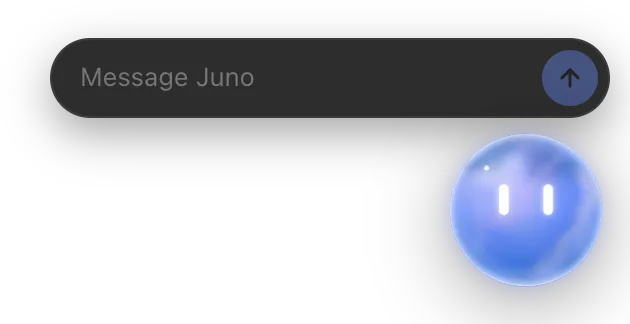
Your Moon can float above your other apps. Click it to send a message, see at a glance what your Orbs are doing, and hide it with one shortcut.
Turn it on
- Open Settings and click the section with your Moon's name.
- Switch on Juno on your desktop (your Moon's name shows here).
Your Moon appears over your desktop and stays above your other apps. Its eyes follow your pointer.
What you can do with it
| Do this | To |
|---|---|
| Click it | Open a small message box: Message Juno |
| Drag it | Move it anywhere on screen |
| Scroll or pinch over it | Make it bigger or smaller |
| Right-click it | Open its menu |
| ⌥⌘O (CtrlAltO on Windows) | Hide it, or bring it back, from any app |
Clicks only land on the Moon, its bubble and its message box. Everywhere else, they go through to whatever's underneath.
Send it a message
- Click your Moon.
- Type in Message Juno. You can paste up to four pictures, like screenshots, too.
- Press Enter. The box says Sent. Anything else for Juno?
Press Esc to close the box. Your Moon's reply shows in its bubble and in its chat in Orbit.
What its bubble tells you
A speech bubble beside your Moon says what's going on, for example:
- Claude is working on "Kestrel Books site" and 2 more
- Codex finished "Splitly invoice export"
- Grok needs your OK in "Landing page copy"
- Juno is checking in…
Click the bubble to open that chat in Orbit. Click its × to dismiss it. When more than one Orb is working, a number on your Moon shows how many.
Its menu
Right-click your Moon for:
- Message Juno and Open Orbit
- Bigger, Smaller and Normal size
- Hide
Common questions
I hid it. How do I get it back?
Press ⌥⌘O (Ctrl+Alt+O on Windows), or switch Juno on your desktop back on in Settings.
Does it work when the Orbit window is closed?
Yes, as long as Orbit is running. Choose Open Orbit from its menu to bring the main window back.
Can I turn off its movement?
It follows your computer's reduce motion setting.
See also What the Moon does, Name, colour and rules and Keyboard shortcuts.
Updated 24 October 2026 · Orbit 0.1.15