Help/Workspace
Changes and pull requests
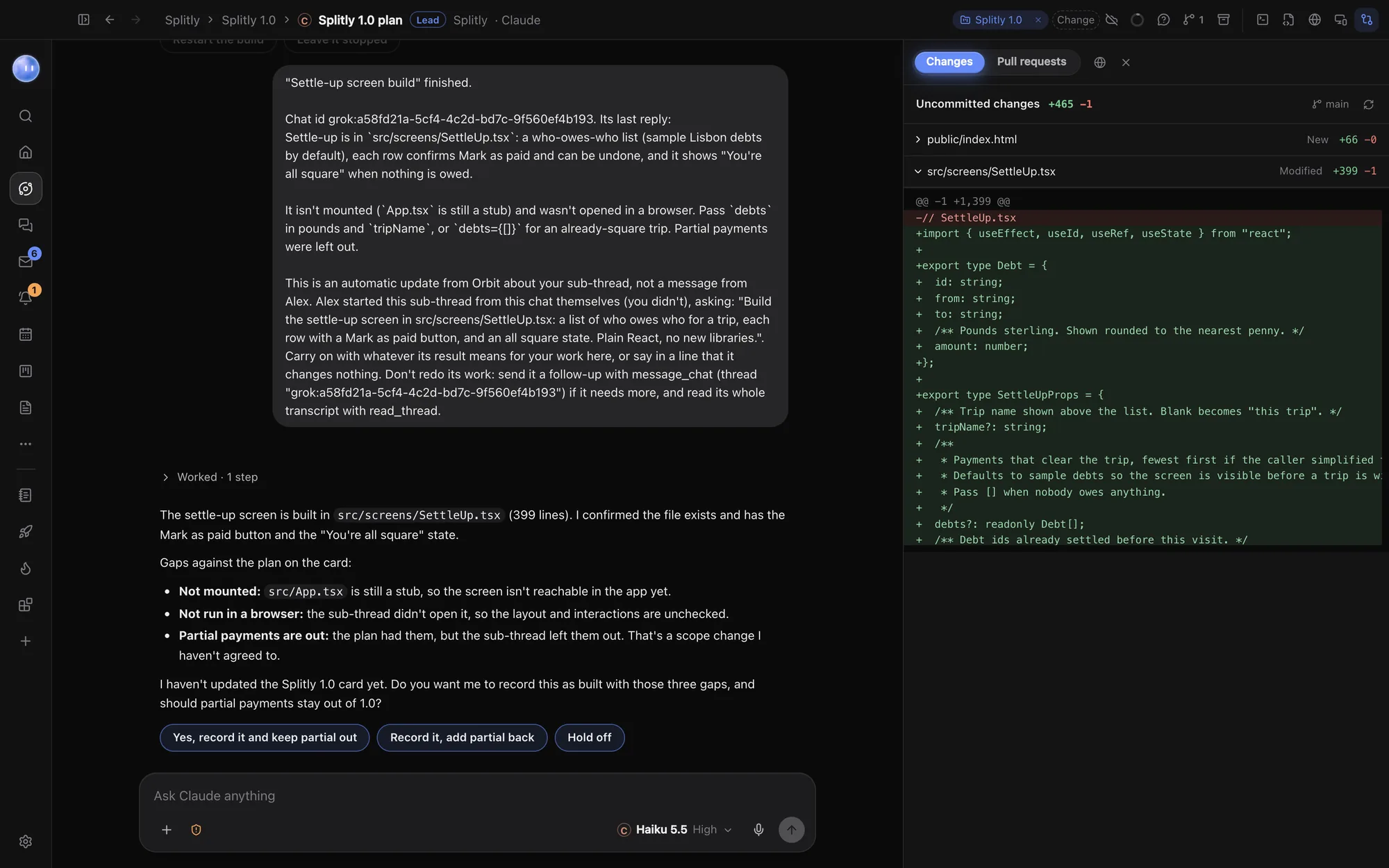
The Changes pane shows what's changed in a project's code since the last commit, whichever Orb changed it. Its second tab lists the project's open pull requests on GitHub, with a one-click review.
See what changed
In a chat, click the Changes button at the top right, or press ⇧⌘D. The pane opens on the right on its Changes tab.
- The top line says Uncommitted changes, with lines added and removed in total, and the branch you're on.
- Each changed file is listed with what happened to it (New, Added, Modified, Deleted or Renamed) and its own counts.
- Click a file to see its changes line by line: green for added, red for removed.
The list refreshes by itself each time an Orb finishes a reply. Click Refresh to check again any time, for example after you've changed something yourself.
The pane reads the project's git repository, so it shows changes from any Orb, any model and any editor. If the project folder isn't a git repository, the pane says so.
Keep or undo changes
The pane is for reviewing. To keep changes, ask the Orb to commit them ("commit this with a short message"). To undo some, tell it which: "put the header back how it was". You can also use git yourself in the terminal.
When an Orb asks to change a file, the approval card shows the change before it's made, so you can say no first. See Waiting on you.
Pull requests
Click the Pull requests tab in the same pane to see the project's open pull requests on GitHub. Each row shows the title, number, author, when it last changed, whether it's a draft, its review state and its size.
Click one to open it. You'll see:
- Who wants to merge which branch into which, with the size and number of files.
- Chips for Draft, the review state (Approved, Changes requested or Review required) and how many checks passed.
- The description, the conversation and every file's changes.
All pull requests goes back to the list, and the arrow button opens it on GitHub.
Have an Orb review it
Click Review with Claude or Review with Codex. Orbit starts a new chat in the project that reads the pull request and its changes, and reports what it finds ranked by how serious each is, each with the file, line and a suggested fix. The review never comments on, approves or pushes anything on GitHub.
What you need for pull requests
Orbit reads pull requests with GitHub's own gh command. If it isn't installed, the tab says so. On a Mac, install it with brew install gh, then run gh auth login in Orbit's terminal and sign in.
Common questions
Can I see changes without a chat open?
The pane shows the project of the chat you're in. Open any chat in the project, or start a new one, to see its changes.
Related: Terminal and editor, Cloud fallback, Permissions and plan mode.
Updated 24 October 2026 · Orbit 0.1.15