Help/Workspace
Files
Files gathers your images, documents, PDFs, spreadsheets, slides, video and audio into one sorted view, so you can find something fast and hand it to an Orb.
Open Files
Click More in the left rail, then Files (pin it to keep it on the rail). The first time, macOS may ask whether Orbit can look in your Downloads, Desktop and Documents folders. Orbit only asks when you use something that needs them, like this page.
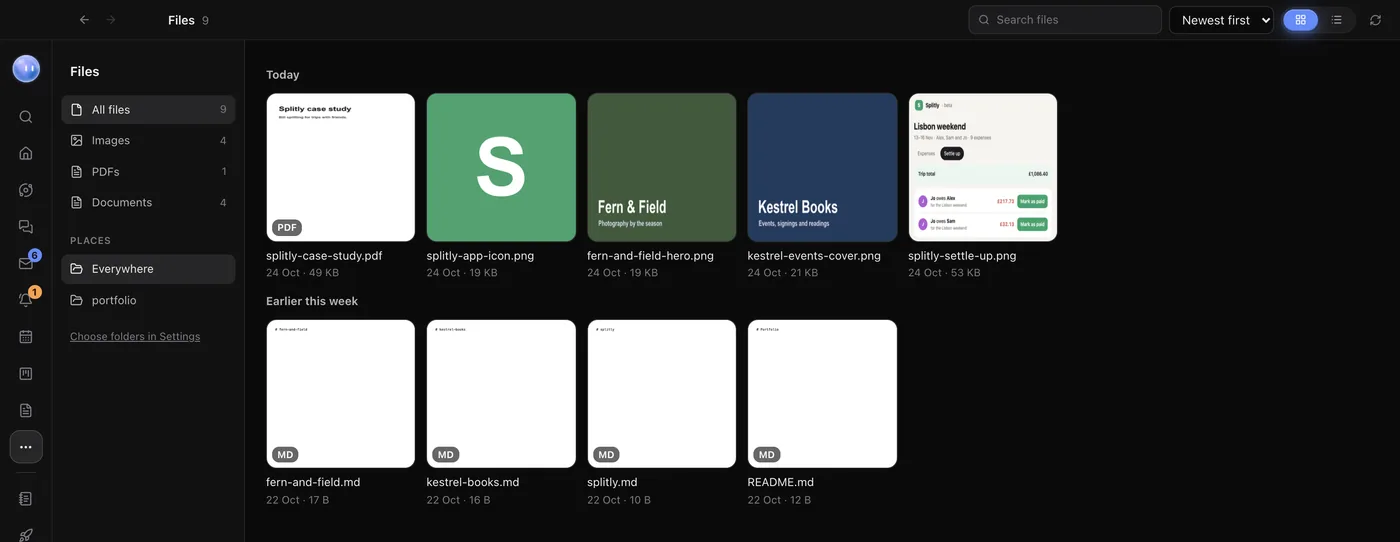
Find a file
- Pick a type on the left: All files, Images, PDFs, Documents, Spreadsheets, Presentations, Video, Audio, Design or Archives.
- Or pick one folder under Places.
- Type in Search files to find one by name.
- Sort by Newest first, Oldest first, Name or Largest first. Sorted by date, files are grouped into Today, Yesterday, This week, This month and then each month.
- Switch between Grid and List.
What you can do with a file
| Button | What it does |
|---|---|
| Quick Look | Previews it without opening another app. |
| Use in a chat | Puts the file in the message box of the chat you're in, ready to send to an Orb. |
| Link to a project | Links it to a project, so it shows on that project's page. |
| Copy path | Copies where it is on your computer. |
| Show in Finder | Opens its folder (Show in Explorer on Windows). |
Choose which folders it gathers from
Out of the box, Files gathers from Downloads, Desktop, Documents and the folder where Codex saves images it makes. To change that:
- Open Settings, then Files.
- Click Add a folder to add another, such as a shared drive.
- Click the x next to a folder (Stop collecting from this folder) to leave it out.
Code projects inside these folders are skipped, so Files stays a list of documents and media, not source code. If something's missing, click Look again at the top of the page.
Files your Orbs make
Screenshots, page checks, brand kits, recordings and downloads go into Downloads/Orbit unless you ask for somewhere else, so they show up here too. Every chat can search your files as well: ask "find the Kestrel Books contract PDF from last month" and the Orb looks through the same list.
Files reads your files where they are, on your computer, and uploads nothing. A file only goes to a model when you send it in a chat.
Related: Pictures and files, Page checks, Projects and folders.
Updated 24 October 2026 · Orbit 0.1.15