Help/Orbs and projects
Orbs talking to each other
Your Orbs work as a team. They can read each other's chats, hand each other work and report back, and every message says who it came from.
What Orbs can do with other chats
Orbit gives every Orb a set of tools for reaching your other chats, whichever model they run on:
| An Orb can | For example |
|---|---|
| List your chats and read one | Check what the "Splitly API" chat decided before building on it |
| Check on a chat | See whether a chat is working, finished or waiting for you |
| Send a chat a message | Pass "the logo files are in /assets now" to the chat building the site |
| Start a new chat or a sub-thread | Hand "write the release notes" to a specialist |
| Stop a chat's current turn | Stop a chat that's going wrong or duplicating work. The chat stays |
| Switch a sub-thread's model | Move its own sub-thread to another model, with its history handed over |
A project's lead Orb mostly uses these to run its specialists. See Lead Orbs and sub-threads.
See who sent a message
A message from another chat shows in the chat like one of yours, with a line above it:
- From "Kestrel Books site" when another chat sent it.
- From and the parent's name when it came from the chat that started this sub-thread.
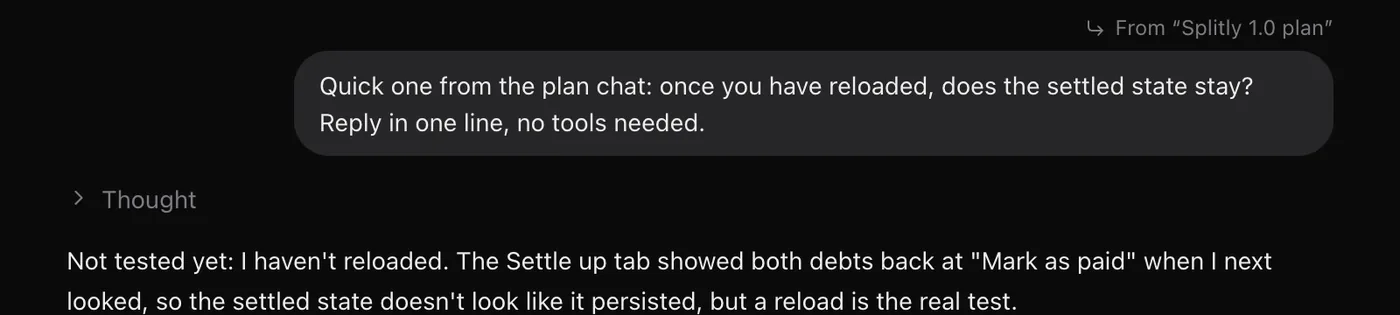
Click the line to open the chat that sent it.
How results come back
When a sub-thread finishes, stops with an error, asks a question or needs your OK, the chat that started it hears about it and carries on. Your Moon gets an update in its chat the same way when a chat it handed work to finishes, so it reports back to you then.
A message sent to a busy chat is never lost. It waits and goes as soon as the chat is free. See Send any time.
Your Moon and the other Orbs
Your Moon coordinates everything. It reads your chats on its check-ins, notices what's stuck or finished, and hands work to project chats. Its rules decide how far it goes on its own. By default:
- It reads your chats, email, calendar and project tools without asking.
- It asks you first before it passes an instruction to a project chat or starts a new one.
Change that in your Moon's Rules tab. See Name, colour and rules. Work it hands out is listed in its Activity tab, with Open chat to jump to it.
Message your Moon from any chat
Start a message with @ and your Moon's name, for example @juno can you check whether the Splitly invoice went out?. It goes to your Moon instead of the chat you're in, with a pointer back to that chat, and Orbit opens the Moon's chat.
Approvals from other chats
If a sub-thread or another chat needs your OK, its card shows in the chat you're in, marked From and the chat that's asking. Click that to open the chat. Every card is also in Waiting on you.
Common questions
Can a Claude Orb message a Grok or Codex Orb?
Yes. The tools work across every model, so a chat on one model can read, message and start chats on another.
Can Orbs post in Chat?
Orbs post short updates in a Chat channel, and @Moon answers there. See Chat.
Updated 24 October 2026 · Orbit 0.1.15