Help/Orbs and projects
Side questions
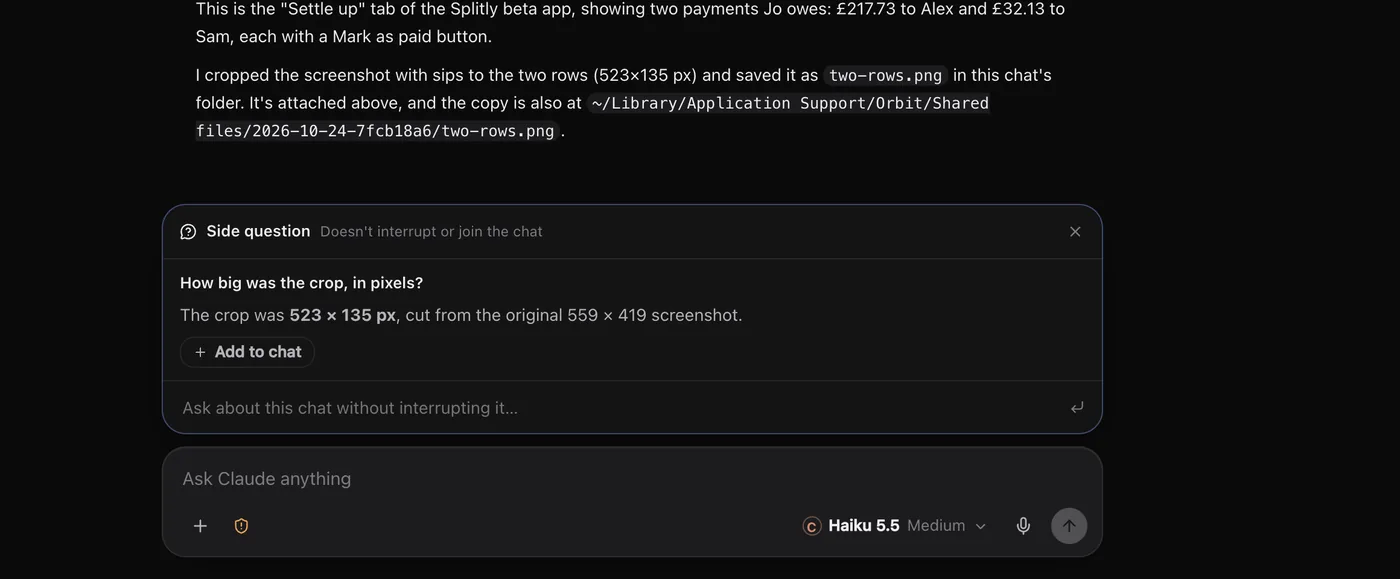
A side question lets you ask about a chat while it works, without interrupting it or adding to it. Press ⌘; to open one.
Ask a side question
- In the chat, press ⌘; (Ctrl; on Windows), or click the Side question button at the top of the chat.
- A small panel opens: Side question, Doesn't interrupt or join the chat.
- Type your question in Ask about this chat without interrupting it… and press Enter.
The chat's own model answers from the conversation so far. The Orb keeps working on its job the whole time.
What to use it for
- "What did it decide about the colour scheme earlier?"
- "Which files has it changed so far?"
- "Explain what that last command does."
- "Is it still on step 2 of the plan?"
Anything you'd ask a colleague over their shoulder, without making them stop.
Add an answer to the chat
Side questions stay out of the chat. If an answer is worth keeping, click Add to chat under it. The question and answer go into the message box, so you can send them on, or edit them first.
Close it
Press Esc, press ⌘; again, or click the ×. Side questions belong to the chat you asked them in: open another chat and the panel starts clean.
Side question or a message?
| Side question | Message while it works | |
|---|---|---|
| Changes what the Orb is doing | No | Yes, at its next step |
| Goes in the chat | Only if you add it | Yes |
| Use it to | Ask about the work | Steer the work |
To steer, send a message instead. See Send any time.
Common questions
Does a side question use my plan?
Yes. The chat's own model answers it, so it comes out of that model's plan like a short message.
Can I ask a side question in the Moon's chat?
Yes, ⌘; works there too. To ask your Moon something quick from anywhere else, press ⌘K, type the question and choose Ask, or click the floating Moon. See Search and ⌘K.
See also Keyboard shortcuts and A tour of the window.
Updated 24 October 2026 · Orbit 0.1.15