Help/Workspace
Cloud fallback
Close the lid and chosen chats carry on in the cloud, on your own Claude or ChatGPT plan. When your Mac is back, the cloud's work comes back into the same chat.
How it works
- Claude chats move to a Claude Code cloud session of their own, on your Claude plan. Orbit sets the session up ahead of time (it just replies "READY"), so handing over as the Mac goes to sleep is one quick message. While you're away you can carry on in the Claude app on your phone.
- Codex chats start a Codex cloud task in your Codex cloud environment, on your ChatGPT plan. That's separate from the OpenAI API key Orbit's Codex chats use, so without a ChatGPT plan, cloud fallback is for Claude chats. It runs once; follow-ups go from the ChatGPT app. Its changes come back as a diff you choose to apply.
- Grok chats stay on your computer. Grok has no cloud of its own: switch the chat to Claude or Codex if you want it to carry on.
Your Moon can use cloud fallback too.
Turn it on
- In a chat, click the cloud button at the top right (Cloud fallback).
- Tick For this chat, or For every chat in Splitly (your project's name) to cover the whole project.
- Check the list under In the cloud it won't have, which says exactly what this chat would be missing.
The same menu has Move to the cloud now, for when you want to hand over without waiting for the Mac to sleep.
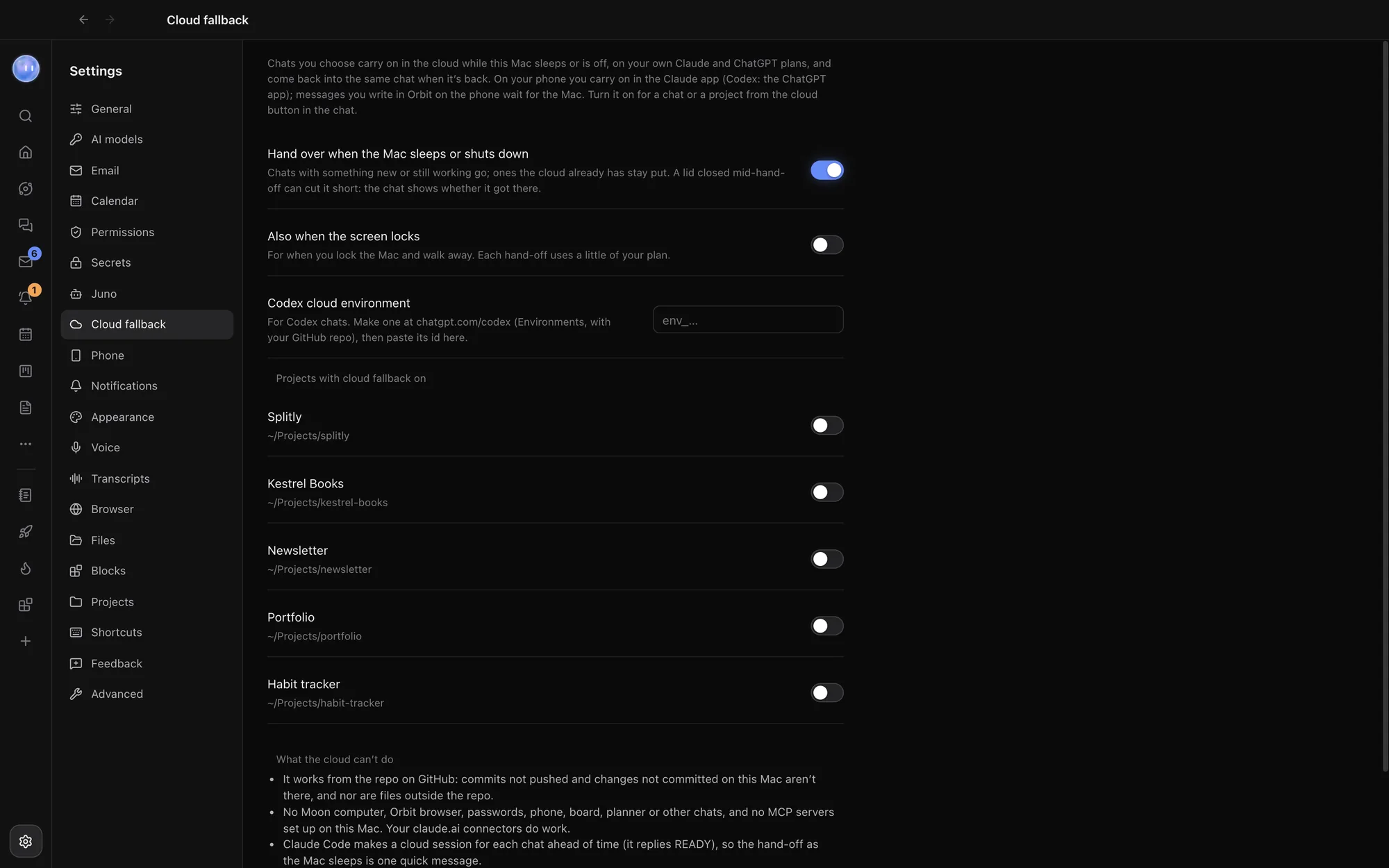
Settings
Open Settings, then Cloud fallback:
| Setting | What it does |
|---|---|
| Hand over when the Mac sleeps or shuts down | On by default. Chats with something new, or still working, go; ones the cloud already has stay put. |
| Also when the screen locks | Off by default. For when you lock the Mac and walk away. Each hand-off uses a little of your plan. |
| Codex cloud environment | For Codex chats. Make an environment at chatgpt.com/codex (Environments, with your GitHub repo) and paste its id here. |
| Projects with cloud fallback on | Turn it on or off for every chat in a project. |
Closing the lid in the middle of a hand-off can cut it short. The chat shows whether it got there.
While it's in the cloud
A bar above the message box says Running in the cloud since…. Messages you send in the chat go to the cloud session, and replies come back into the chat. From the cloud button you can Open in the Claude app (or ChatGPT), Check the cloud now, or Bring it back to the Mac.
When your Mac wakes, Orbit brings the cloud's work back into the same chat by itself: the cloud's turns appear in the chat, and its next reply knows about them. For Codex, choose Apply Codex cloud's changes… when you're ready.
What the cloud can't do
- It works from your repository on GitHub. Commits you haven't pushed, changes you haven't committed, and files outside the repo aren't there. A folder that isn't a git repository has no files in the cloud at all.
- It doesn't have your Mac's apps, Orbit's browser, saved passwords or secrets, the Moon's computer, your phone, the Board, the Planner, other chats, or MCP servers set up on your computer. Connectors you've added at claude.ai do work.
- It pushes code only to a
claude/branch. It never merges, deploys, sends, publishes or buys anything.
What's sent, and what's kept where
| What | Where it goes |
|---|---|
| The hand-off message | To your own Claude Code cloud session (Anthropic) or Codex cloud task (OpenAI), on your plan. It holds the chat's name and project, the repository, branch and commit, the list of what the cloud won't have, the rules above, and the chat so far as text: your messages and replies, plans, commands run, and the names of files edited and tools used. Long messages are shortened, pictures aren't sent, and a later hand-off sends only what's new. |
| Your code | The cloud reads it from GitHub, not from your Mac. |
| Your cloud settings and each chat's cloud link | A file in Orbit's data folder on your computer: which chats and projects are on, and for each chat its session or task id, link, where it is now and what's been brought back. |
| Bringing work back | Orbit copies the cloud session to your computer for a moment to read it, folds its turns into the chat, then deletes the copy. |
Orbit's own server isn't involved. The hand-off goes straight from your computer to Claude Code or Codex, signed in as you.
Common questions
Does it cost extra?
Not from Orbit. The cloud work runs on your own Claude or ChatGPT plan and uses some of its limits.
Can I message the chat from Orbit on my phone while the Mac sleeps?
Messages you write in Orbit on your phone wait for the Mac. To talk to the cloud session while you're away, use the Claude app (or ChatGPT for Codex).
Related: Changes and pull requests, Orbit on Android, What the Moon does.
Updated 24 October 2026 · Orbit 0.1.15