Help/Workspace
Waiting on you
When an Orb needs your yes, it stops and asks. Waiting on you gathers every one of those asks, from every chat, into one list you can clear in a minute.
Open it
Click Waiting on you in the left rail (the bell). Its badge shows how many things are waiting, and the page header says how many are left to answer. When there's nothing, it says All clear.
What lands here
| Label | What it is | Your answers |
|---|---|---|
| Wants to run a command | The exact command, and the folder it runs in. | Allow, Allow for this chat, Decline |
| Wants to change a file | The file and the change, shown before it's made. | The same |
| Wants to use a tool | A tool, like a connector, with what it would send. | The same |
| Plan to approve | An Orb in plan mode has written its plan. | Go ahead, or Change the plan and say what to change |
| Question | A question only you can answer, sometimes with choices. | Pick a choice or type an answer |
| Needs a secret | An API key or login the chat needs. See Secret box. | Save and allow, Save and allow for this chat, Decline |
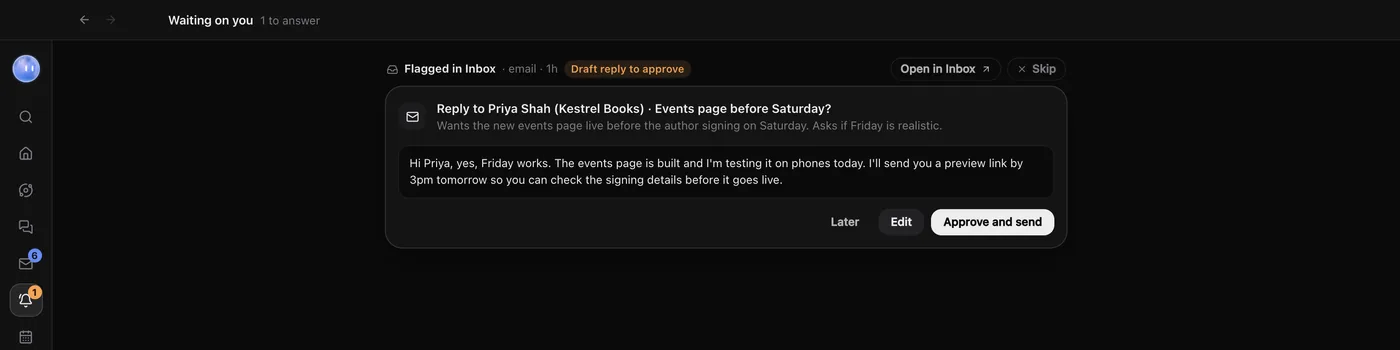
| Draft reply to approve | A reply your Moon drafted to a message flagged in your Inbox. | Approve and send, Edit, Later |
| Question in the Claude app | A question a Claude chat asked in the Claude desktop app, which Orbit picks up so you can answer here. | Pick a choice or reply |
Allow for this chat means the same kind of thing won't ask again in that chat. Your permission settings decide what asks in the first place. See Permissions and plan mode.
Answer without opening the chat
Each item shows which chat it's from (its model, name and project) and what it wants. Answer it right there and the chat carries on. If you need more context, click Open chat (or Open in Inbox for a draft reply).
Draft replies
For a draft reply, read the draft, then:
- Approve and send sends it as written.
- Edit lets you say what should change, or write the reply yourself, then Send to Juno (your Moon's name) for a new draft.
- Later takes it off this list for now.
Your Moon never sends an email or message without your OK. Approving the exact text here is that OK.
Skip
Every item has Skip, for things that don't need you any more. What it does depends on the item:
- An approval, question or secret request is declined quietly, and the chat carries on without it.
- A plan is turned down, and the chat stops there.
- A draft reply leaves this list and stays in Inbox, under Flagged.
- A question from the Claude app is hidden, and nothing is sent to the chat.
On your phone
The phone app has the same list, under Waiting in its dock, and notifies you when something new needs you. See Approve from your phone.
What your Moon approved
From Orbit 0.1.17 your Moon can answer other Orbs' routine requests for you. Everything it approved is listed here, marked Approved by and your Moon's name, with an Undo where one is possible. See Your Moon approves for you.
Common questions
Does an Orb keep working while it waits?
No. That chat pauses at that step until you answer. Other chats keep going.
Can I answer in the chat instead?
Yes. The same card is in the chat. Answer in either place and it leaves both.
Related: Permissions and plan mode, Drafts and replies, Approve from your phone.
Updated 24 October 2026 · Orbit 0.1.15