Help/Your day
Google Calendar
Bring your calendars into the Planner so your meetings sit beside your time blocks. Google Calendar connects two ways; other calendars connect by link or account and show read only.
Where to connect
Open Settings, then Calendar. You need to be signed in to your Orbit account (Settings, Orbit account), because the Google connection belongs to your account. That's what lets your phone and your booking page use it too.
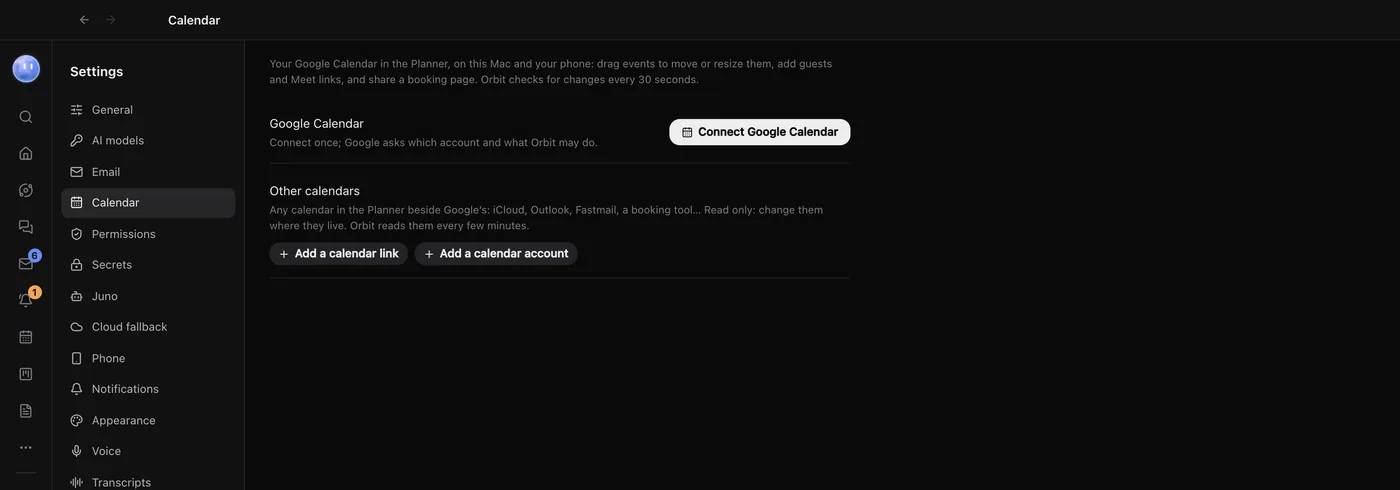
Connect Google Calendar
- In Settings, Calendar, click Connect Google Calendar.
- Your browser opens Google's sign-in. Choose your account and allow what Orbit asks for.
- Come back to Orbit. The row says Connected as your address.
- If you have more than one Google calendar, tick the ones to show under Calendars in the Planner. Your main calendar is always on, and new events go there.
If Settings says signing in with Google is on its way, the direct connection isn't switched on for your copy yet. Add your Google Calendar under Other calendars with its secret iCal link instead (below). Its events show in the Planner, read only.
What you can do with Google Calendar connected
- Two-way changes. Drag events you organise to move or resize them, and edit the title, day, time, place and description. Changes go back to Google.
- New events with guests and a Google Meet link, from the Event button on the Planner.
- Guests are only emailed when you say so. When you save an event with guests, Orbit asks Send invitations?, Send the update? or, when you delete one, whether to tell them it's cancelled. Nothing goes until you choose.
- Invitations from others show too. Only the organiser can change them; you can remove them from your calendar.
Orbit checks Google for changes every 30 seconds and straight after you change something. The Google Calendar button on the Planner's toolbar shows when it last checked; click it to check now. If Google stops accepting Orbit's sign-in, the button changes to Reconnect calendar.
Repeating events: changes made in Orbit apply to that one event only. Change the whole series in Google Calendar.
Add other calendars
Under Other calendars there are two ways in. Both show events in the Planner without changing the calendar itself.
| Option | Use it for | What you need |
|---|---|---|
| Add a calendar link | Google, Outlook, iCloud, booking tools, anything with an iCal or .ics link | The calendar's private link. Google: Settings, your calendar, Integrate calendar, Secret address in iCal format. Outlook: Settings, Calendar, Shared calendars, Publish a calendar, ICS. iCloud: share the calendar as a Public Calendar and copy its link. |
| Add a calendar account | iCloud, Fastmail, Yahoo, Zoho, Nextcloud or any CalDAV calendar | Your address and an app password made for Orbit. Orbit fills in the server where it can, and offers a Make an app password button. |
Each one has a switch to show or hide it in the Planner, and shows how many events it read and when.
Your booking page
With Google Calendar connected, a Booking page section appears. It's a page anyone can open to book time with you. It only offers times inside your working hours that are free on your calendar, adds a Google Meet link, and emails both of you. It doesn't take payments.
- Choose a Link name, Your name on the page, your Time zone and your Working hours for each day (add a break with a second set of hours).
- Click Create booking page. Copy or open the link from the top of the section.
- Add meeting types, such as a 30-minute "Intro call". Each has a length, buffers before and after, notice, how far ahead people can book, a description, and switches for Require my approval, Add a Google Meet link and Show on my page. Each type has its own link too.
A type that needs your approval holds the slot and shows the request in the Planner with Approve and Decline. Upcoming bookings are listed under Coming up. Turn Taking bookings off to pause the page.
Where the connection is kept
Your Google Calendar connection lives on Orbit's account server, not on one computer, so your Mac, your phone (through your Mac) and your booking page all use it without signing in again. The server keeps Google's sign-in for your account, encrypted, and uses it to read and change your events when Orbit asks. It asks Google for your events, your calendar list and your free and busy times, nothing else. Your booking page settings and booking types are kept there too. Disconnecting withdraws Orbit's access with Google and deletes the connection from the server.
Calendars added by link or account are different: Orbit reads them from your computer, and the app password for a calendar account is stored in your computer's secure storage.
Common questions
Does Orbit email my guests without asking?
No. Orbit asks before any invitation, update or cancellation goes to guests, and sends nothing if you say no.
What happens if I disconnect Google Calendar?
Its events leave the Planner and your booking page stops taking bookings. Your Google Calendar itself isn't touched.
Related: Planner, Inbox, Orbit on Android.
Updated 24 October 2026 · Orbit 0.1.15